


What the Local Services Ads Migration Means for Advertisers
Google is about to make one of the biggest structural changes to Local Services Ads in years. If your business relies on LSAs for leads, one detail deserves your immediate attention: historical LSA performance data will not transfer into Google Ads after migration.
Google is expected to begin moving Local Services Ads into Google Ads starting in August 2026 through a phased rollout. Campaigns will run under Performance Max while continuing to use a pay-per-lead model.
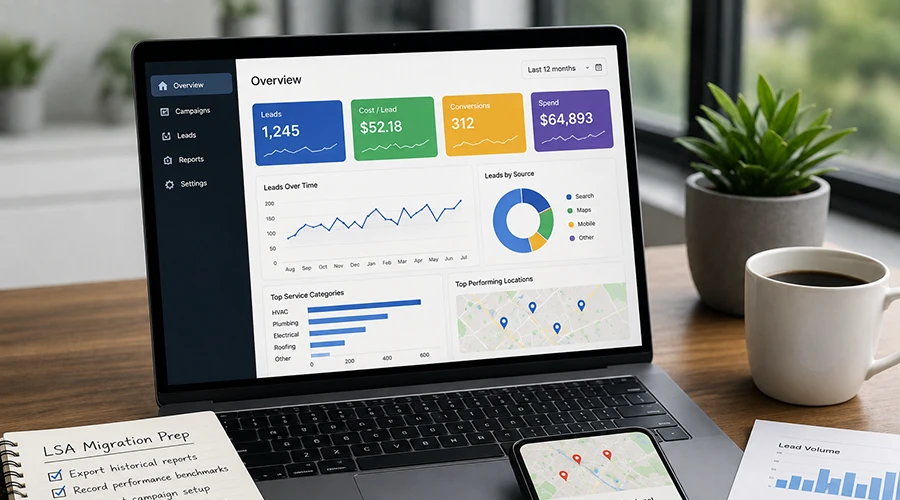
Before your account moves, export your existing reports and document your current performance. Those records will give you a reliable benchmark for comparing results after the transition.
This guide explains what is changing, what is expected to remain the same, and how home service businesses can prepare for the migration.
What Is Changing with Local Services Ads?
Local Services Ads currently operate through a separate platform that connects local businesses with nearby customers searching for their services.
The upcoming migration will bring LSA campaign management into Google Ads, where campaigns will run under Performance Max while retaining the existing pay-per-lead model. Google says this new format is being developed specifically for local service advertisers and is expected to preserve important features of the current program.
The move places LSAs inside a platform where automated bidding, reporting, and optimization already play a significant role. After migration, advertisers should review their campaign settings, confirm that business information transferred correctly, and understand which aspects of campaign management Google now automates.
What Is Expected to Stay the Same?
Although the campaign structure and management platform are changing, the core LSA model is expected to remain familiar.
Advertisers will continue paying for leads
Local Services Ads use a pay-per-lead model rather than the pay-per-click structure used by many Google Ads campaigns.
Based on the migration information provided, advertisers will continue paying for valid leads generated through their ads rather than for every ad click.
Ads will continue reaching local customers
Migrated campaigns are expected to continue connecting businesses with relevant local customers across Google Search and Google Maps.
Existing campaign information will transfer
Google is expected to transfer existing campaign settings and connected Google Business Profile information into the new format.
Advertisers should still review their campaigns after migration to confirm that service categories, locations, budgets, business details, and lead settings appear correctly.
What Will Not Transfer?
Historical LSA performance data will not carry over after the account migrates. Advertisers who want to retain those records should export them before migration. Otherwise, previous reporting may not be available within the new Google Ads campaign interface for future comparisons.
The announcement only confirms that historical reporting will not transfer. It does not explain whether other campaign signals will carry over or how Google may use them after migration.
For that reason, it would be inaccurate to claim that every migrated campaign will “start from scratch.” The supported concern is that advertisers may lose access to their previous reporting within the new interface unless they preserve it beforehand.
Why Historical LSA Data Matters
Historical reporting provides a baseline for evaluating campaign performance before and after the transition.
Without those records, it may be more difficult to answer questions such as:
- How many leads did the campaign generate each month?
- What was the average cost per lead?
- Which service categories produced the most leads?
- Which locations performed most consistently?
- How did lead volume change by season?
- What percentage of leads became booked jobs?
The migration itself does not prove that campaign costs or performance will change. However, preserving historical reports gives businesses a reliable benchmark for evaluating lead quality, cost per lead, booked jobs, and overall advertising performance after the transition.
Why This Migration Matters for Home Service Businesses
Local Services Ads are an important lead source for many HVAC companies, plumbers, roofers, electricians, pest control providers, restoration companies, and other home service businesses.
Moving these campaigns into Google Ads may create a more centralized management experience. It will also bring LSAs into a platform that relies heavily on automated campaign systems.
Automation can simplify parts of campaign management, but it does not replace advertiser oversight. Businesses still need to confirm that campaigns reflect the services they provide, the areas they serve, and the types of leads they want to receive.
The immediate priority is not predicting whether performance will improve or decline. It is making sure the business has enough information to evaluate the campaign after it moves.
How to Prepare for the LSA Migration
Advertisers do not need to overhaul their campaigns before migration. Instead, they should focus on preserving historical reports and documenting their current campaign setup before the phased rollout reaches their account.
1. Export historical reports
Download available reports from the current Local Services Ads platform.
When possible, preserve at least the previous 12 months of data so seasonal changes can be reviewed. Businesses with longer sales cycles or useful year-over-year records may want to export a broader date range.
2. Record current performance benchmarks
Document the metrics that matter most to the business, such as:
- Monthly lead volume
- Average cost per lead
- Total monthly spend
- Calls and messages received
- Charged and credited leads
- Booked appointments
- Completed jobs
- Revenue from LSA leads
Google’s reports may not include every business outcome. Booked jobs, completed work, and revenue may need to come from a CRM, call-tracking platform, or internal records.
3. Document the current campaign setup
Record the settings in place before migration, including:
- Budget
- Bidding strategy
- Target cost per lead, if used
- Service categories
- Service areas
- Business hours
- Lead types
- Connected Google Business Profile
Screenshots can provide an additional reference if the settings appear differently after migration.
4. Review the Google Business Profile
Because associated business information is expected to transfer, confirm that the connected Google Business Profile is accurate.
Review the business name, address, phone number, hours, service area, and categories. Any updates should accurately represent the business and follow Google’s guidelines.
5. Confirm Google Ads account access
Make sure the business owner, internal marketing contact, and advertising agency have the appropriate access to the correct Google Ads account.
Resolving access issues early can make it easier to review the campaign when it becomes available in the new platform.
What to Review After the Campaign Moves
Once the campaign appears in Google Ads, verify that the transferred setup reflects the business’s previous LSA configuration.
Review:
- Budget and bidding settings
- Service categories
- Geographic coverage
- Business information
- Lead types
- Account access
- Reporting options
- Google Business Profile connection
Compare the new reporting with the benchmarks recorded before migration. Avoid drawing conclusions from only a few days of data, since lead volume can fluctuate because of seasonality, demand, competition, and budget.
Businesses should also continue tracking qualified opportunities, booked appointments, completed jobs, and revenue outside the advertising platform when possible. Lead volume and cost matter, but the clearest performance review connects advertising activity with qualified leads and booked work.
How Activate Digital Media Can Help
Activate Digital Media helps home service businesses navigate major Google Ads changes while keeping campaigns focused on meaningful business results.
For the LSA migration, we can help preserve historical records, document pre-migration benchmarks, verify transferred settings, and connect advertising performance with qualified leads and booked jobs.
As Google brings more automation into campaign management, clear reporting and careful oversight can help businesses maintain control of what matters.
Frequently Asked Questions
The phased migration is expected to begin in August 2026 for home service and storefront advertisers. Because the transition is being rolled out in phases, individual accounts may not move at the same time.
Google says existing settings and Google Business Profile information will carry over as accounts move into Google Ads. Advertisers should review the campaign after migration to confirm that the transferred information appears correctly.
No. Based on the migration information provided, Local Services Ads will continue using pay-per-lead goals rather than a pay-per-click model.
Historical LSA performance data is not expected to transfer into Google Ads. Advertisers should export and save their existing reports before migration.
There is not enough confirmed information to say that the migration will automatically improve or reduce performance. Advertisers should compare results before and after the transition using a meaningful reporting period.
Preserve Your LSA Data Before Migration
Moving Local Services Ads into Google Ads is a significant structural change, making now the best time to preserve your historical reports and document your current campaign setup before migration.
Need help preparing for the transition? Contact Activate Digital Media for a complimentary Google Ads review. We'll help preserve your reporting, verify your migrated campaign setup, and keep your advertising focused on qualified leads, booked jobs, and measurable business results.
Ready to Grow Your Business?
Contact us to work with a result-driven digital marketing agency. Are you ready to take your business and online marketing to the next level.
Get Your Free Marketing Plan →