


When the Visitors Stay but the Source Disappears
Your analytics report shows a sharp drop in ChatGPT traffic.
But before you rewrite your content strategy, look at what happened to Direct. The visitors you think you lost may still be arriving, just without the information your reporting needs to identify where they came from. That distinction can change a budget decision.
What a tracking bug can teach us about AI traffic is straightforward: recorded referrals measure visits your analytics can attribute, not every visit AI may have influenced. An October 2026 ChatGPT link-tagging incident made that limitation visible. At Activate Digital Media, our approach to AI visibility connects discovery with measurement. Here is what happened, how to investigate a similar change, and how to build reporting that supports better decisions.
What Happened to ChatGPT Referral Tracking?
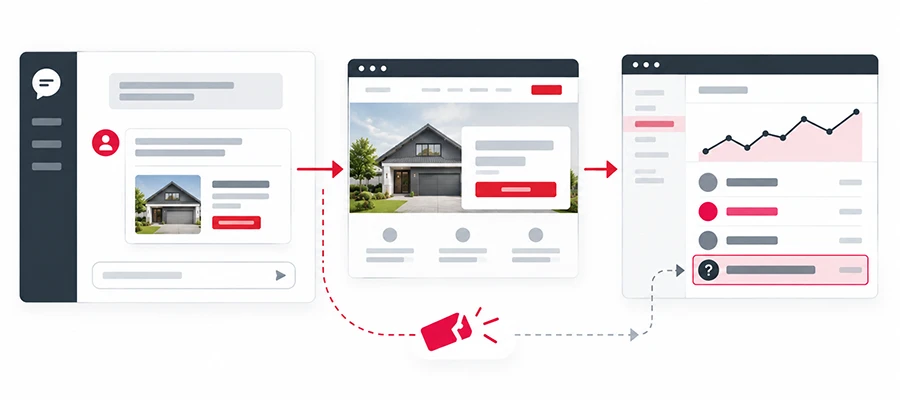
Cedric Huesler compared October 9–13 with the previous week across about 500 pages where ChatGPT accounted for at least 5% of visits. He reported roughly 31,000 fewer visits per day attributed to ChatGPT and about 26,000 more visits per day recorded as direct traffic on those same pages. This was a selected, sampled dataset—not a measure of all websites or proof that every increase in direct traffic came from ChatGPT.
Huesler connected the pattern to links arriving without a referrer or the utm_source=chatgpt.com parameter. Without those source signals, visits could appear as Direct.
In his follow-up on the tracking fix, Huesler said OpenAI confirmed the bug to him on October 14 and that a fix began rolling out on October 15. That is his account of the exchange, rather than a separate public OpenAI incident report.
The business lesson is broader than one platform: a reporting decline can reflect lost attribution, lost visitors, or both. Investigate before deciding which explanation fits your website.
What a Tracking Bug Can Teach Us About AI Traffic
Attribution Depends on a Chain of Signals
A visitor clicks a link, the browser opens a destination, any redirects run, and your analytics receives the information available when tracking executes. Each handoff can affect whether the source remains identifiable.
UTM parameters are labels attached to a URL. Referrer information is a separate signal that can identify the page or site a visitor came from. A missing UTM tag alone does not automatically make a visit Direct if another usable source signal survives.
Google explains that Direct traffic lacks a clear referral source. Typed URLs and bookmarks are possible origins, but missing tracking information can also contribute to that category.
Direct Is a Clue, Not Proof of AI Discovery
A drop in ChatGPT referrals alongside a Direct increase deserves attention. It does not justify relabeling the entire increase as AI traffic.
Untagged email links, shared documents, redirects, and other tracking changes can create similar patterns. Compare timing, landing pages, devices, and business outcomes before forming a conclusion.
The useful question is whether your evidence supports a tracking explanation, not how much Direct traffic you can claim for AI.
A Fix Cannot Recreate Information Never Collected
Once tracking resumes, future visits may become identifiable again. That does not automatically repair historical data from the affected period.
If your analytics collected neither the source tag nor usable referral information, renaming a channel cannot manufacture that missing evidence. Preserve the recorded data and label any reconstruction as an estimate with clear assumptions.
How to Investigate an AI Referral Drop
Compare the Same Pages and Comparable Days
Start with pages that previously received identifiable AI referral traffic. Compare matching weekdays before, during, and after the suspected incident.
Use a table like this to guide the investigation:
| Signal | What to Check | What It Can Tell You |
|---|---|---|
| Recorded AI referrals | Source trends on previously visited pages | Where attribution changed |
| Direct traffic | Changes on those same landing pages | Whether some visits may have shifted categories |
| Total sessions | Comparable dates and devices | Whether overall recorded visits also declined |
| Qualified inquiries or sales | Mature outcomes for the affected pages | Whether business performance moved with the report |
| Technical changes | Tags, redirects, consent settings, and releases | Whether your implementation offers another explanation |
These are related views of activity. Do not add Direct, total sessions, and source-specific sessions together as though they were separate audiences.
Test the Journey on Desktop and Mobile
Open a real link from the AI assistant where available. Record the destination URL and check whether tracking parameters survive any redirect.
Test relevant desktop and mobile paths separately. An app, browser, or integration can handle outbound links differently.
Ask your analytics team to confirm what the destination receives and whether the tracking tag runs correctly. A screenshot of the final web page alone cannot establish what source information was captured.
Inspect source and campaign details. Check whether current ChatGPT links include utm_source=chatgpt.com and whether your analytics records those visits correctly. Huesler reported that referrer information was still missing on most ChatGPT clicks after the fix, so checking the referrer alone is not enough. Also review redirects, consent settings, and cross-domain behavior.
Check Changes Before Changing Strategy
Review your deployment history, analytics settings, consent configuration, and platform release notes around the first affected date. Compare your findings with credible incident reports.
Document the suspected start, evidence, tests, and observed recovery in your reporting notes. Avoid assuming every account recovered at the same moment simply because a fix was announced.
How to Track AI Traffic in Google Analytics
Start With Session-Level Acquisition Data
Google’s Traffic acquisition report is designed to show where new and returning sessions originate. In GA4, open Reports > Acquisition > Traffic acquisition, where that report is available in your navigation.
Use Session source / medium or Session source as the primary dimension to inspect recorded sources, including ChatGPT and other AI tools. Then compare landing pages, devices, engagement, and key events for the same period.
Use session-level dimensions consistently for this investigation. A first-user acquisition report answers a different question: how someone was originally acquired, rather than the source associated with the session you are examining.
Check the AI Assistant Channel
Google now documents an AI Assistant category in the default channel group. It includes sources such as ChatGPT and Gemini, while excluding Google’s AI Overviews and AI Mode, which fall under Organic Search.
Check that channel alongside source-level reporting. A channel label summarizes attribution rules; it does not guarantee that every AI-influenced visit has been identified.
Google also says traffic from its AI search features is included in Search Console’s overall Web search performance reporting. A ChatGPT source filter therefore cannot measure all AI search discoveries.
Use Custom Grouping When It Serves a Clear Purpose
A custom channel group can help when your reporting needs a consistent, documented set of AI sources beyond the default view.
Google’s custom channel group guidance allows source-based rules and requires Editor access or higher to create or edit groups. Review rule order because traffic enters the first matching channel.
Validate the resulting group against source data before using it in client reporting. Avoid broad rules that collect unrelated traffic simply because a source name contains “AI.”
A custom group organizes the evidence you have. It cannot recover an unknown source from Direct traffic.
Measure Visibility, Visits, and Business Outcomes
Keep Human Visits Separate From Automated Requests
“AI traffic” can describe several different activities. Distinguish them before building a business case:
| Activity | Useful Measurement | Limitation |
|---|---|---|
| A person clicks an AI answer’s link | Attributed sessions and subsequent actions | Missing source information can hide the origin |
| An AI system fetches a page | Verified server or CDN requests | A fetch is not a human visit or customer |
| Your brand appears in an AI answer | Recorded mentions, citations, and recommendations | Visibility does not establish a click or sale |
| Someone discovers you through AI and visits later | Customer feedback and broader journey evidence | The later session may not identify the earlier influence |
OpenAI’s crawler documentation distinguishes search crawling, model-training crawling, and certain user-triggered page requests. Those activities should not be added to human referral sessions.
Server logs can help identify requests and technical errors. If source information is absent there too, another analytics platform cannot automatically recover it.
Judge Traffic Quality With Your Own Outcomes
An engaged visitor may be researching, troubleshooting, applying for work, or preparing to buy. Time on site helps describe behavior, but it does not establish customer value.
Compare AI-referred visitors with relevant audiences using:
- Qualified inquiries and completed bookings.
- Purchases, revenue, and cancellations.
- Service-area fit or sales qualification.
- Conversion rates supported by enough observations.
Report counts alongside rates. Two sales from ten sessions can be promising, but that sample cannot establish a dependable long-term conversion rate.
Keep comparisons aligned by period, landing page, device, and conversion definition where practical. Changes in the audience you can identify can also change reported quality.
Pair AI Visibility With Commercial Results
Monitor relevant answers for brand mentions, accurate recommendations, and links to useful pages. Record the prompt, platform, date, and context so repeated checks have meaning.
Use those observations alongside identifiable visits and downstream outcomes. A citation is evidence of visibility; a qualified lead or sale is evidence of business activity. Neither replaces the other.
ADM’s call and form tracking services help connect website activity with inquiries. Customer-reported discovery can add context, provided it remains separate from observed click attribution.
Make Better Decisions From Imperfect Traffic Data
What a tracking bug can teach us about AI traffic is that a source label is only one part of the customer journey. When that label changes, check the underlying visits, technical signals, and business outcomes before changing direction.
Reliable reporting combines evidence, documents gaps, and keeps estimates distinguishable from observed results. That gives your team a stronger basis for deciding which content and channels deserve further investment.
Frequently Asked Questions
No. Internal navigation should not be tagged as though it were a new external acquisition source. Use a documented tagging approach for external links you control, and preserve legitimate incoming parameters through redirects.
You can compare them in a broader dashboard, but keep their acquisition methods identifiable. Paid placements involve spend and campaign measurement; organic citations and recommendations answer different performance questions.
No. A mention may generate no click, and some visits may arrive without identifiable source information. Check visibility separately rather than treating referral sessions as a complete record of AI exposure.
It can provide supporting context. Someone may remember several touchpoints or use a broad answer such as “Google,” so report self-reported discovery separately from analytics attribution.
Include them in regular reporting maintenance and revisit them after a platform change, new referral domain, or unexplained shift. Keep a change log so your team can distinguish a reporting update from a change in visitor behavior.
Understand What Your Traffic Reports Are Telling You
Before changing your marketing strategy, check whether a traffic shift reflects customer behavior or a tracking problem. Activate Digital Media can help you review your analytics and connect the findings to leads and business outcomes.
Talk to our team about your tracking and reporting.
Ready to Grow Your Business?
Contact us to work with a result-driven digital marketing agency. Are you ready to take your business and online marketing to the next level.
Get Your Free Marketing Plan →