


How to Read a Local SEO Heat Map and Identify Your Next Improvement
Your business appears near the top of Google Maps when you search from the office. A prospective customer across town sees several other companies first. Both observations can be accurate.
A local SEO heat map checks a business’s position for a defined search at multiple locations. Use it to see where visibility is strong or weak within the sampled area.
For businesses serving The Woodlands and Houston, the next question is what to do with that pattern. This guide explains the settings, calculations, and evidence needed to turn a map into useful work.
What a Local SEO Heat Map Measures
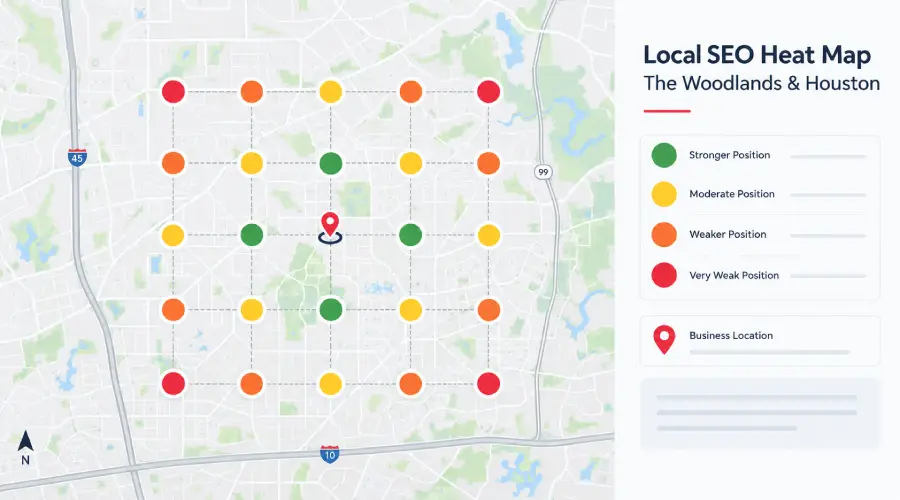
A local SEO heat map places a set of search locations, often called a grid, over a geographic area. The tool checks a selected business and keyword at each point and displays the observed position.
Every check describes:
- One business.
- One query.
- One search location.
- One time.
- One search surface.
A point marked 3 means the tool observed position three under those conditions. It does not mean every nearby customer sees the same result.
Semrush’s Map Rank Tracker documentation describes this approach using a business location, map pins, and chosen keywords. Its reports include individual rankings and summary measures. Other products use related methods with different definitions and display conventions.
Distinguish this report from a website heat map, which shows interactions such as clicks or scrolling on a page. Also distinguish Maps results from regular organic website rankings, paid ads, and AI answers. Those surfaces can present different businesses and pages.
Our broader local SEO guide covers the website and profile work surrounding this measurement. A grid is one diagnostic view within that larger program.
Why Results Vary by Location
Google describes local ranking in terms of relevance, distance, and prominence. Relevance concerns the match to the search; distance concerns the searcher’s location; prominence concerns how well known the business is. Google does not offer a way to pay for a better organic local ranking. These principles appear in its local ranking guidance.
For a business owner, the practical implication is straightforward. An office-based search samples one situation. It cannot establish coverage throughout The Woodlands, Spring, or Houston.
A different service query can also produce a different pattern. A company might be visible for its main service and less visible for a specialty that is poorly explained on the website or does not accurately match its profile. A map helps identify that pattern; it does not establish the cause by itself.
A red section is a reason to investigate, not a diagnosis. Check distance, competition, query relevance, business eligibility, collection problems, and changes in the result set.
Check the Report Settings
Before asking why the map changed, confirm that you are comparing the same measurement.
| Setting | What to record | Why it affects the comparison |
|---|---|---|
| Business | Exact profile and location | Similar names or branches can create confusion |
| Query | Exact words entered | Different services can produce different results |
| Search surface | Maps, local results, or another supported surface | Positions are meaningful within that surface |
| Grid | Center, dimensions, spacing, and active points | A different area changes the sample |
| Date and time | Scan time and time zone | Observations come from a particular moment |
| Scan depth | Maximum positions the tool checks | “Not found” depends on the limit |
| Summary method | Formula and treatment of missing results | Products may calculate scores differently |
Keep device and language settings where the tool exposes them. If they are not available, record that limitation rather than filling in an assumed value.
Preserve the original export or report link. A cropped screenshot without settings may be visually persuasive but difficult to compare later.
Changing a grid is sometimes sensible. A business may expand its real coverage or need a closer view of a particular area. Start a new baseline or clearly mark the change. Do not present an improvement caused by removing weak points as evidence that rankings improved.
Choose a Relevant Grid
Begin with the actual operating area. A company concentrating on The Woodlands should not judge its performance solely through a large grid centered on downtown Houston. Equally, a very tight grid around the office may omit neighborhoods the company considers important.
Ask operations three questions before choosing the grid:
- Where do we want more work?
- Where can we schedule efficiently?
- Where do service restrictions apply?
Use the answers to select a main grid and any smaller diagnostic areas.
A larger grid shows a broader pattern with the spacing selected. A denser grid gives more detail within an area. Neither is automatically better; the appropriate choice depends on the decision and the cost of collecting the data.
Do not interpret land coverage as customer coverage. A point in a sparsely served area carries the same visual weight as another point unless the report explicitly applies a weighting method. The map itself does not know the number of relevant prospects, their demand, or their likely profitability.
If you identify a priority subset of points, define it before evaluating improvement and report both the complete grid and that subset. This makes the business emphasis clear without disguising the wider result.
Read the Positions Behind the Score
The legend is the first reference. Green often represents stronger positions, but color thresholds differ by product and configuration. Check the numbers and definitions.
Three measures are particularly useful when they are clearly defined.
The Distribution of Positions
A distribution groups points into ranges. You can see whether most of the map is near the top, just outside it, far down the checked results, or not found within the scan depth.
This helps distinguish a business with several promising near-top areas from one appearing only in a small cluster. Both could receive an average that hides those differences.
Top-Three Coverage
A simple, transparent calculation is the number of valid checked points showing positions one through three divided by all valid checked points, multiplied by 100.
Local Falcon calls its top-three share measure Share of Local Voice. Do not assume every product’s similarly named metric uses that formula. In particular, Semrush describes its Share of Voice as a weighted ranking metric.
Label a simple calculation “top-three coverage of the checked points” unless you are using the tool’s exact metric and definition. This percentage describes the sample. It is not the percentage of all searches, clicks, customers, or market revenue captured.
Average Rank and Unobserved Results
Average rank needs its calculation rule attached. Semrush’s documentation uses 21 in its average for rankings beyond position 20. Local Falcon distinguishes an average of found positions from a total measure that incorporates points outside its visible scan range; see its ARP and ATRP guide.
That difference can materially change the story. A business visible at just a few points can have a strong average among those found positions while missing from much of the map. Read coverage and distribution beside any average.
“Not found” also needs care. A report that checks only a limited number of results cannot establish a precise position beyond that limit. Keep missing scans, failed checks, and genuine observations outside the scan depth separate where the product distinguishes them.
A Worked Before-and-After Example
The figures below are hypothetical. They illustrate interpretation and are not ADM client results or a forecast. Assume the same 25 valid points, the same business, the same query, and unchanged settings.
| Observed position range | First scan | Follow-up scan |
|---|---|---|
| Positions 1 through 3 | 8 points | 12 points |
| Positions 4 through 10 | 7 points | 6 points |
| Positions 11 through 20 | 6 points | 4 points |
| Outside the checked top 20 | 4 points | 3 points |
| Total valid points | 25 points | 25 points |
Top-three coverage increased from 8 divided by 25, or 32%, to 12 divided by 25, or 48%. That is a gain of 16 percentage points. It is also a 50% relative increase in this particular coverage measure.
Those calculations do not establish 50% more calls or revenue. They also do not identify the work that caused the change. You would need the change log, repeated observations, and other evidence to investigate that question.
Inspect the individual points next:
- Did visibility improve where you want customers?
- Did a priority zone weaken while other points improved?
- Are the same competitors present?
The distribution table alone cannot answer these questions.
You also cannot calculate an exact average rank from these grouped counts. The specific position at each point is necessary. A report that fills in an average without that underlying information is adding precision the data does not provide.
Investigate the Pattern
A useful heat-map review produces a short investigation list.
| Pattern in the report | Reasonable next question | Evidence to inspect |
|---|---|---|
| Strong around one area and weaker farther away | Does this reflect distance and the competitive field | Same-query results at representative points |
| Main service visible but a specialty weak | Is the specialty accurately represented and relevant | Profile categories, service copy, actual offering |
| A broad decline in one scan | Is the result repeatable or a collection problem | Scan status, settings, later observations |
| Good visibility with few qualified inquiries | Is the issue demand, messaging, contact handling, or measurement | Search activity, inquiry records, booking path |
Use representative points to inspect the result set. A competitor appearing repeatedly is worth understanding: what service is it presenting, which location is being shown, and what useful evidence can a customer see?
Competitor research should inform your explanation and service presentation. It should not lead to copying a name, category, service claim, or review practice that does not fit your business.
The same restraint applies to a dramatic improvement. Before celebrating, verify that the correct profile was tracked and the area did not shrink. An accurate explanation is more useful than a larger green screenshot.
Prioritize Verified Improvements
Start with problems you can verify. A vague instruction to “improve the red areas” is difficult to assign and impossible to close responsibly.
Verify Business Information
Review the actual name, primary activity, hours, contact details, and location or service-area arrangement. Compare the profile with the business’s website and operational records.
Google’s business representation guidelines require accurate representation and address or service-area information. Categories should describe the business. Do not add words to the business name, claim an office, or select unrelated categories simply because a competitor seems to benefit.
A confirmed inaccuracy has a clear owner and correction. A suspected ranking factor requires investigation. Keep those types of task separate so a marketing report does not turn every observation into an unsupported technical diagnosis.
Improve the Relevant Service Page
If the weak query concerns a service you genuinely provide, inspect the relevant page. Does it explain the service, its scope, the customer problem, actual coverage, and the next step? Can a prospective customer understand whether the company is suitable?
A useful revision might add an approved process explanation or clarify exclusions. It might also connect an existing guide to the service page. A generic paragraph repeating the keyword and several cities is less useful.
For businesses reviewing geographic coverage, ADM’s pages for The Woodlands and Houston provide examples of where local service context belongs within an agency website. Your own pages should describe your own operations and audience.
Use Real Customer Evidence
Make it easy for customers to understand who performs the work and what previous customers experienced. Use approved project examples, accurate credentials, and a consistent process for inviting honest feedback.
Google prohibits incentives for reviews and selectively soliciting positive reviews in its Maps user-contributed content policy. A review process should welcome genuine feedback without a reward or a filter designed to exclude dissatisfied customers.
Treat customer evidence as a responsibility to the reader. Avoid claims that a particular number of reviews, weekly posts, or photographs guarantees a ranking. A map can help evaluate visibility after improvements, but it does not make unsupported promises true.
Record What Changed and When
For each task, document the page or profile affected, the exact correction, the responsible person, and the publication date. Include other material changes such as a new location, a service launch, or an advertising campaign.
At the next review, you can compare the report with that history. Several changes made together may be sensible operationally, but they make it harder to attribute a movement to one action. Acknowledge that when interpreting the result.
Check Service Areas and Multiple Locations
A service-area setting describes where a business operates. It should not be treated as a guarantee of visibility everywhere listed.
Google’s service-area guidance distinguishes businesses that visit customers from those that also receive customers at a business address. If customers are not served at the address, the guidance says to remove that address from the public profile. Service areas are specified using supported areas such as cities or postal codes, rather than a radius setting.
Those public profile settings and a rank-tracking grid serve different purposes. Your reporting tool may use a radius or point spacing to define a measurement sample. That does not change the business’s profile eligibility or actual coverage.
For a franchise or company with several legitimate locations, track each relevant profile separately. Decide which location is supposed to serve each territory and make the website’s routing understandable. A strong result for one branch should not conceal a weak or incorrect listing for another.
Do not create extra profiles for neighborhoods merely to fill a grid. Validate the eligibility of a proposed location against Google’s current guidelines before making changes. Clear customer routing and accurate operations come first.
Connect Visibility to Customer Outcomes
A grid measures observed visibility. To judge the business outcome, add a second set of information from the profile, website, and customer records.
Google Business Profile’s performance reporting calls a click on the profile’s call button a “call.” That does not by itself establish that a conversation connected or produced a job. Its performance documentation also describes website-click and other available measures.
Use actual contact records to identify genuine service requests. Then distinguish qualified inquiries, booked appointments, completed jobs, and collected revenue. Record the customer’s requested service and area when appropriate, and avoid counting the same opportunity twice because someone both called and submitted a form.
Where suitable, call and form tracking can support that connection. The tracking setup should preserve a working contact path and produce records the team can reconcile with its booking system.
Suppose the hypothetical map improves in a priority zone but qualified inquiries remain unchanged. Investigate the contact path, demand, offer, and observation period. Do not assume that the better map must have generated unrecorded revenue.
Conversely, inquiries can increase while the grid stays similar. Other marketing, repeat customers, seasonality, or a stronger offer may contribute. Our SEO metrics guide explains why several measures are needed to interpret performance.
Set a Useful Review Routine
Choose a reporting frequency that matches the work being evaluated and the resources available. A weekly check can be a useful starting routine for an active local program, with a monthly discussion of patterns and business outcomes. This is a planning recommendation, not a claim that rankings must change within a month.
Keep the main grid stable. Save the settings and exports. Review meaningful movements across repeated scans, then inspect representative points where the pattern changed.
End each review with a small number of specific decisions. Correct a confirmed profile error. Improve a service explanation. Examine a priority area’s inquiry records. Continue observing when there is too little evidence to justify a change.
The report should help the team choose work. If it produces only screenshots and a general assurance that SEO is improving, ask what decision follows from the evidence.
Frequently Asked Questions
A search from the office reflects one search location and context. Local results can change when the searcher’s location, query, or result set changes. A grid samples several points so you can see the pattern. It still represents selected observations rather than every customer’s experience.
No. A color reflects the tool’s position range or reporting convention. Weak visibility can have several explanations, including the selected service, distance, competition, or a collection issue. Check the underlying positions and relevant evidence before treating the map as proof of a penalty.
Understand the formula first. Tools can use different meanings for similarly named measures. Improvement under an unchanged method is useful evidence of movement within that sample. Assess whether it includes the areas and services that matter, and keep business outcomes separate from the visibility score.
List the areas the business actually serves, following Google’s current eligibility and service-area rules. Adding an area is not a substitute for being relevant and competitive there. Define the operating territory with the people responsible for scheduling and delivery before expanding either the listing or the measurement.
Correct a confirmed business-information or contact-path problem promptly. For an unexplained ranking fluctuation, verify settings, collection status, and repeat observations before making a major strategy change. The appropriate review period depends on the work, market, and amount of evidence available.
It cannot establish profitability on its own. Combine visibility with verified inquiries, customer outcomes, costs, and a documented attribution method. A strong map can identify a promising search presence; profitability depends on the customers and economics that follow.
Ask for an Actionable Map
Before your next review, mark one weak area your team can serve and one strong area worth protecting. Bring the grid settings and relevant inquiry records. Ask what evidence supports the next action and how you will check whether it helped. A better-colored map is useful only when you understand what changed and why it matters.
If you serve The Woodlands or Houston and want help interpreting local visibility, contact Activate Digital Media. Bring the report, its settings, the services you want to grow, and the areas you can serve. That gives the discussion a practical starting point.
Ready to Grow Your Business?
Contact us to work with a result-driven digital marketing agency. Are you ready to take your business and online marketing to the next level.
Get Your Free Marketing Plan →