


More Conversions Can Still Mean Fewer Customers
Your Google Ads dashboard shows more conversions after you enable AI Max. Your sales team sees more inquiries that never become customers. Which result should guide your next budget decision? Without a controlled comparison and a clear definition of success, a busier dashboard can make a weaker campaign look stronger.
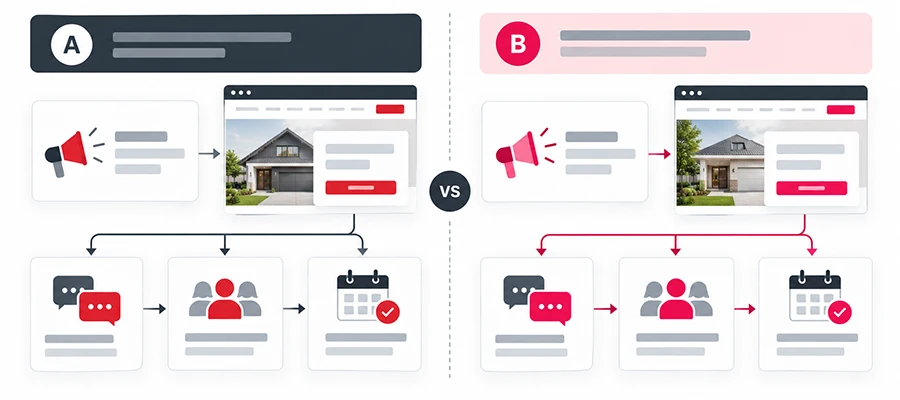
Here is how to test Google AI Max without guessing: compare AI Max against a control running at the same time, keep unrelated settings consistent, and judge results using qualified leads or sales after allowing for ramp-up and conversion delays. At Activate Digital Media, our Google Ads management approach connects campaign decisions to business results. This guide explains what to test, which controls to check, and when the evidence supports expanding, stopping, or continuing an experiment.
What AI Max Changes in Search Campaigns
AI Max for Search is an optimization layer within Search campaigns, rather than a separate campaign type. Its targeting and creative features can change which searches trigger your ads, the messaging people see, and where they land.
Google describes three main capabilities in its explanation of how AI Max works:
- Search term matching: Uses broad match and keywordless technology to expand beyond existing keywords.
- Text customization: Creates additional headlines and descriptions using inputs such as existing ads and landing page content.
- Final URL expansion: Selects a relevant page on your domain when Google predicts better performance.
This article focuses on AI Max for Search. Performance Max is a separate campaign type that reaches across multiple Google channels.
Google’s AI Max overview cites 2025 internal data showing typically 14% more conversions or conversion value at a similar CPA/ROAS for non-retail advertisers. That is a platform benchmark, not a forecast for your account—and it does not mean a 14% increase in conversion rate.
How to Test Google AI Max Without Guessing: Define the Test
Write a Business Question Before Changing Settings
Start with a question your business can answer:
“Can AI Max generate more qualified inquiries within our acceptable acquisition cost?”
Define “qualified” before launch. For a home service company, that might mean a genuine request for an offered service, inside the service area, from someone the team can contact.
Choose one primary decision metric, such as cost per qualified lead, cost per booked job, or conversion value relative to spend. Use click-through rate and raw lead volume to explain performance, while keeping the business outcome central to the decision.
Choose a Full-Suite or Feature-Specific Test
A full-suite test asks whether the combined AI Max configuration improves results. A narrower test asks whether one capability adds value.
For example, you could test search term matching while leaving text customization and final URL expansion off in the treatment. Later, a separate experiment could evaluate adding the creative features.
Record the exact configuration. A successful full-suite test supports that combination; it cannot tell you how much improvement came from each feature individually.
Check Measurement and Bidding Readiness
Before testing, submit a form, complete a test call, and check that each action reaches the correct system. Confirm that duplicate tags or repeated imports are not recording the same event twice.
Where practical, connect offline conversions to outcomes such as qualified inquiries or completed sales. ADM’s call and form tracking services support the measurement needed to assess which inquiries have business value.
Use a suitable conversion-based Smart Bidding strategy, such as Maximize Conversions, Target CPA, Maximize Conversion Value, or Target ROAS, depending on the campaign goal. Google’s AI Max FAQ states that search term matching does not work with manual CPC bidding.
If a bidding change is necessary, make and evaluate that change before the AI Max experiment. Changing both together makes their individual effects harder to assess.
Build a Fair Control and Treatment Comparison
Use Google’s Experiment Framework
Turning AI Max on and comparing this month with last month leaves weather, demand, competition, and seasonality mixed into the result. A simultaneous control provides a stronger comparison.
Google’s dedicated AI Max experiments split traffic and budget within an existing campaign between a control with AI Max off and a treatment with it on.
In Google Ads, open Campaigns > Experiments > + > Campaign features and settings > AI Max for Search campaigns. Select your campaign and review the test settings.
Google also documents an eligible one-click recommendation that creates a 50/50 split. Confirm the split in your setup; equal allocation does not guarantee identical actual spend or conversion counts.
Keep Unrelated Settings Consistent
Before launch, save a record of the campaign’s:
- Budget, bidding strategy, and CPA or ROAS targets.
- Conversion goals, values, and attribution settings.
- Location targeting, schedules, and audience settings.
- Keywords, negative keywords, and advertiser-created ads.
Keep these consistent between control and treatment except for the intended test differences. Avoid simultaneously rebuilding landing pages, launching a major offer, or restructuring the keyword list.
For the first test, we recommend one established, eligible campaign with enough activity to support a useful comparison. More campaigns and more changes can make the explanation harder to follow.
Set Guardrails Before Launch
Separate Brand Demand From New Reach
If the goal is non-brand growth, decide how your own brand will be handled before the test begins. A rise in searches for your company name can improve headline metrics without demonstrating that you reached additional customers.
Google’s experiment guide states that brand inclusions or exclusions added during setup apply to both arms. Verify that behavior before launch.
Review brand and non-brand results separately where reporting allows. Conversions attributed to AI Max are not automatically incremental conversions. Incrementality concerns the difference against what the control would have produced.
Review Queries, Pages, and Generated Copy
Keep relevant negative keywords in place; Google confirms that AI Max respects them. Review emerging search terms for services you do not offer, unsuitable intent, and locations you cannot serve.
If testing final URL expansion, identify pages that should not receive paid traffic, such as careers pages, outdated promotions, or unrelated articles. Apply suitable URL exclusions using Google’s final URL expansion controls.
Final URL expansion requires text customization. Pinned responsive search ad assets may not be used when an expanded destination is selected; URL inclusions also affect pinning, so check those settings if specific wording must always appear.
Google’s text customization guidance explains that generated assets draw on your website and other campaign inputs. Check landing page content and generated ad copy for accurate pricing, service areas, availability, and claims.
Test the Full Click Path
Open candidate landing pages with tracking applied, then test the form or booking process. Google warns that incompatible tracking templates can cause expanded landing pages to return 404 errors.
A page that loads correctly without tracking has not passed this check. Verify both the customer experience and the recorded conversion.
Allow Time for Learning and Delayed Conversions
Plan for Volume and Conversion Cycles
Google’s AI Max reporting guidance recommends at least two weeks of ramp-up before making routine changes. That period alone does not establish that an experiment has enough evidence.
Separately, Google’s Smart Bidding testing guidance recommends campaign and experiment splits that would provide at least 30 conversions in the previous 30 days. This is bidding-test guidance, not a universal AI Max eligibility threshold or a guarantee of reliable results.
Our recommendation is to plan around the volume each arm is likely to receive, the improvement you need to detect, and the time it takes leads to become customers. A small campaign may need a longer test, or may not support a useful comparison within an affordable budget.
Monitor Without Constantly Retuning
Set review dates and an affordable spending limit before launch. Allow for the learning phase, then evaluate a stable period with sufficiently mature conversions.
Keep checking tracking, destinations, and claims. Fix broken pages or materially misleading ads promptly, record the intervention, and consider whether the experiment needs restarting.
Routine reactions to a few weak days can interrupt the comparison. Likewise, repeatedly extending a test until a favorable result appears makes the decision less trustworthy.
Evaluate Business Results and Choose the Next Step
Look Beyond the Cheapest Reported Lead
Consider this hypothetical example with equal spend and fully matured outcomes:
| Metric | Control | AI Max Treatment |
|---|---|---|
| Ad Spend | $3,000 | $3,000 |
| Reported Leads | 60 | 75 |
| Cost per Reported Lead | $50 | $40 |
| Qualified Leads | 30 | 20 |
| Cost per Qualified Lead | $100 | $120 |
| Booked Jobs | 15 | 10 |
| Cost per Booked Job | $200 | $300 |
The treatment produces 25% more reported leads, yet fewer qualified leads and booked jobs. Judging only the platform’s lead count would favor the weaker business outcome in this example.
For your account, compare actual spend, mature outcomes, and the experiment’s uncertainty. Where available, review confidence intervals or significance indicators; a small apparent improvement may still be inconclusive.
Use Reports to Explain the Result
Google’s AI Max reporting includes search terms, assets, and landing pages. Use those reports to investigate:
- Whether new queries reflect relevant search intent.
- Whether branded searches explain the improvement.
- Whether selected landing pages match the service requested.
- Whether generated messaging accurately represents the offer.
Treat these as diagnostic views of campaign activity. Do not add search-term, asset, and landing-page conversions together; the same conversion can appear across those views.
Also distinguish a lead from its later booking or sale. Track the stages separately, and use a consistent customer identifier when reconciling business outcomes.
Decide Whether to Expand, Stop, or Keep Testing
Use the decision rules established before launch:
- Expand cautiously when mature results support a meaningful improvement at acceptable acquisition costs.
- Stop or revise when outcomes materially worsen or the configuration creates unacceptable query, page, or messaging problems.
- Call the result inconclusive when uncertainty remains too large to support a decision.
Review other campaigns too. If AI Max gains attributed conversions while branded Search or Performance Max loses similar volume, investigate whether credit or traffic shifted. A campaign experiment does not automatically establish an account-wide increase in customers.
Make the Decision Your Business Can Defend
A useful AI Max test connects a defined configuration to a fair comparison and measurable customer outcomes. More reach, clicks, or reported conversions matter when they help your business acquire customers at an acceptable cost.
Start with reliable tracking, protect the control, and allow results to mature. Expand when the evidence supports it, and retain uncertainty when the data cannot yet answer the question.
Frequently Asked Questions
Google lists restrictions including shared budgets, portfolio bidding strategies, active experiments, and existing text customization. The dedicated flow also excludes campaigns targeting Display. Check the current eligibility guidance before changing a working campaign simply to make it selectable.
Google’s dedicated experiment guide places ad group adjustments after initial creation, while its broader FAQ describes setup flexibility. Confirm the available controls in your account and document the final configuration before the test begins.
No. AI Max expands on existing targeting; deleting exact match keywords is not a prerequisite. Keep unrelated keyword changes out of the experiment so you can assess the intended feature configuration.
A promotion can change customer demand and conversion behavior. If the promotion is central to your business question, give both arms the same offer; otherwise, choose a more representative period so the results are easier to apply afterward.
No. Familiarity with Dynamic Search Ads can inform your page and query checks, but it does not predict how the selected AI Max configuration will perform. Evaluate the actual settings and campaign mix you plan to use.
Build an AI Max Test Around Qualified Growth
Activate Digital Media can help you assess tracking readiness, define success, and plan how to test Google AI Max without guessing. Our focus is the connection between campaign performance and the customers your business wants to win.
Talk to our team to discuss your Search campaigns and the measurement needed for a useful test.
Ready to Grow Your Business?
Contact us to work with a result-driven digital marketing agency. Are you ready to take your business and online marketing to the next level.
Get Your Free Marketing Plan →