


Why Your Google Ads Landing Page Matters
Imagine a homeowner searching for an emergency plumber. Your Google Search ad offers immediate leak repair, and you've selected a service page with a prominent phone number and booking button. But what if Google sends that customer to your homepage or a general plumbing blog instead?
With certain Google Ads automation settings, the page visitors reach may differ from the one you selected during campaign setup. Sometimes that helps customers find more relevant information. Other times, it creates extra steps before they can schedule service.
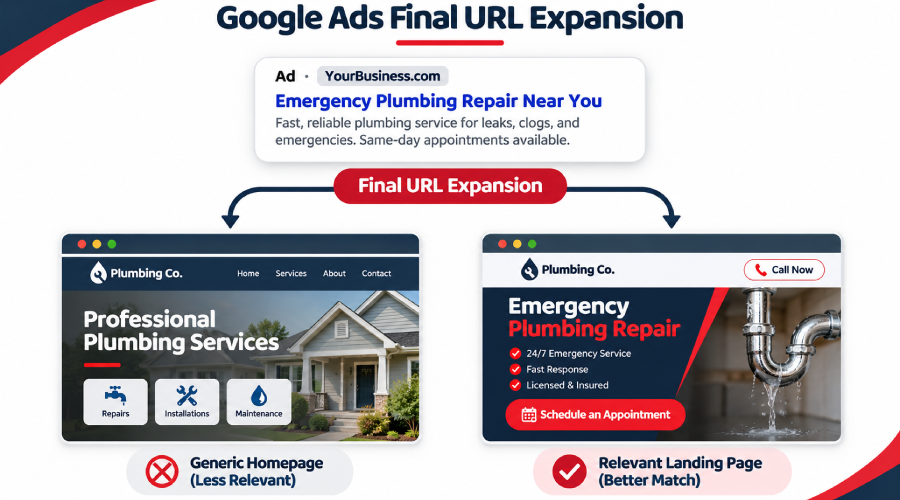
What Is Final URL Expansion in Google Ads?
Final URL expansion is a feature within AI Max for Search campaigns. When enabled, Google may replace your chosen final URL with another relevant page from your website based on someone's search.
The feature works with text customization, which can generate matching ad headlines and descriptions using landing-page content. This functionality was formerly known as automatically created assets.
For example, if a homeowner searches for dryer vent repair, Google may choose a dedicated repair page instead of the general services page you originally selected.
However, Final URL expansion doesn't change every ad destination. Google may select another page when it determines that the alternative better matches the search and relevant ad group.
Search campaign Final URL expansion is not the same as URL expansion in Performance Max campaigns. Although both can influence landing-page selection, their settings and reporting should be reviewed separately.
When Is Final URL Expansion Turned On?
According to Google's AI Max documentation, Final URL expansion is enabled by default when advertisers opt in to AI Max for Search campaigns.
To review the setting:
- Open the relevant Search campaign in Google Ads.
- Select Settings → AI Max.
- Review Text customization and Final URL expansion under the available asset optimization settings.
Final URL expansion requires text customization to be enabled. You can turn off Final URL expansion independently, but disabling text customization also prevents Final URL expansion from operating.
During campaign setup or an existing campaign review, confirm the actual settings rather than assuming the feature is active.
When Google Sends Customers to the Wrong Page
A home service website may contain separate pages for repairs, installations, financing, careers, and educational articles.
Consider a roofing company advertising emergency storm damage repair. A homeowner with a leaking roof needs a page explaining emergency services and how to request help—not a careers page or a general article about roofing materials.
If the landing page doesn't match the search, the visitor may leave without contacting the business.
However, a different destination isn't automatically worse. A dedicated storm repair page may be more helpful than the homepage if it answers the customer's question and offers a clear next step.
What Makes a Landing Page Relevant?
A useful home services landing page should include:
- Clear headlines: Tell visitors immediately which service the business provides.
- Short paragraphs and bullet points: Help mobile users find important details without reading lengthy sections.
- Accurate service-area information: Confirm whether the business serves the customer's location.
- Transparent pricing information: Explain available prices, estimates, or pricing factors when appropriate.
- Visible contact options: Make the phone number, appointment link, or booking button easy to find.
For example, an HVAC repair page with a clear service headline, local coverage details, and a visible scheduling option may help customers take action with less effort.
These elements support a better visitor experience, although their actual effect on conversions should be evaluated using campaign results.
How Can You Control Which Pages Google Uses?
Google provides advertisers with options for managing Final URL expansion.
When text customization and Final URL expansion are enabled, advertisers can exclude URLs that shouldn't be selected as alternative destinations.
For example, a plumbing company may want to exclude its careers page while keeping emergency repair, drain cleaning, and water heater service pages eligible.
Advertisers can exclude individual URLs or use supported rules to exclude groups of pages. This may help limit unsuitable destinations without disabling the entire feature.
The available controls depend on campaign type. Performance Max campaigns have separate URL expansion settings and exclusion options, so businesses should not assume that the same steps apply to both campaign types.
Before making changes, review the pages receiving traffic. Excluding too many relevant URLs may remove useful destinations and limit opportunities to reach potential customers.
What Might This Look Like for an HVAC Company?
Imagine an HVAC company running Google Search ads for air-conditioning repair.
Its website includes a dedicated repair page, a maintenance service page, and a blog explaining why air conditioners stop cooling.
During a campaign review, the advertising team discovers that some people searching for immediate AC repair are being sent to the educational blog instead of the repair page.
This is a hypothetical example, not an ADM client result.
The team should check whether the article answers the visitor's question, provides a clear repair-service link, and generates qualified phone calls or appointment requests.
If visitors frequently leave without contacting the business, the team may consider improving the page or excluding it from Final URL expansion.
If the blog consistently produces qualified repair inquiries, keeping it eligible may be the better decision.
The goal is to evaluate actual customer behavior rather than assume Google's automated page selection is always harmful.
Four Landing-Page Checks for This Week
- Check your campaign settings. Confirm whether AI Max, text customization, and Final URL expansion are enabled in the relevant Search campaign.
- Review the destinations receiving traffic. Open the Landing pages report and compare the pages with the services advertised. Where available, use the Selected by column to identify AI Max-selected URLs.
- Decide which pages should remain eligible. Review outdated pages, irrelevant content, and pages without clear contact options. Consider targeted URL exclusions or turning Final URL expansion off when appropriate.
- Monitor what happens next. After making changes, compare qualified calls, form submissions, and booked jobs with the earlier results rather than judging success by clicks alone.
For more guidance, review Google's instructions for Final URL expansion and AI Max reporting.
Review Where Your Google Ads Send Customers
Are your Google Ads directing potential customers to the most relevant service pages?
We can review landing-page destinations, campaign settings, and lead records to identify areas needing attention. If the review identifies content or design changes, ask us about our landing-page services.
Talk to our team about where your Google Ads send customers. Share your website and concern through our contact form. We'll confirm the scope and account access needed before reviewing your campaign settings and landing-page destinations.
Frequently Asked Questions
No. Google may select an alternative landing page when the feature is enabled and another eligible page better matches the search. Not every click results in a different destination.
Yes. Advertisers can disable Final URL expansion while retaining other available AI Max capabilities.
Yes. URL exclusions can prevent specified pages, including careers pages, from being selected through Final URL expansion when the required settings are enabled.
No. Performance Max has its own Final URL expansion controls and reporting. Review the appropriate campaign settings before applying exclusions.
Not necessarily. Review actual landing pages and lead performance first. Targeted exclusions may address unsuitable destinations without disabling the feature entirely.
Ready to Grow Your Business?
Contact us to work with a result-driven digital marketing agency. Are you ready to take your business and online marketing to the next level.
Get Your Free Marketing Plan →